

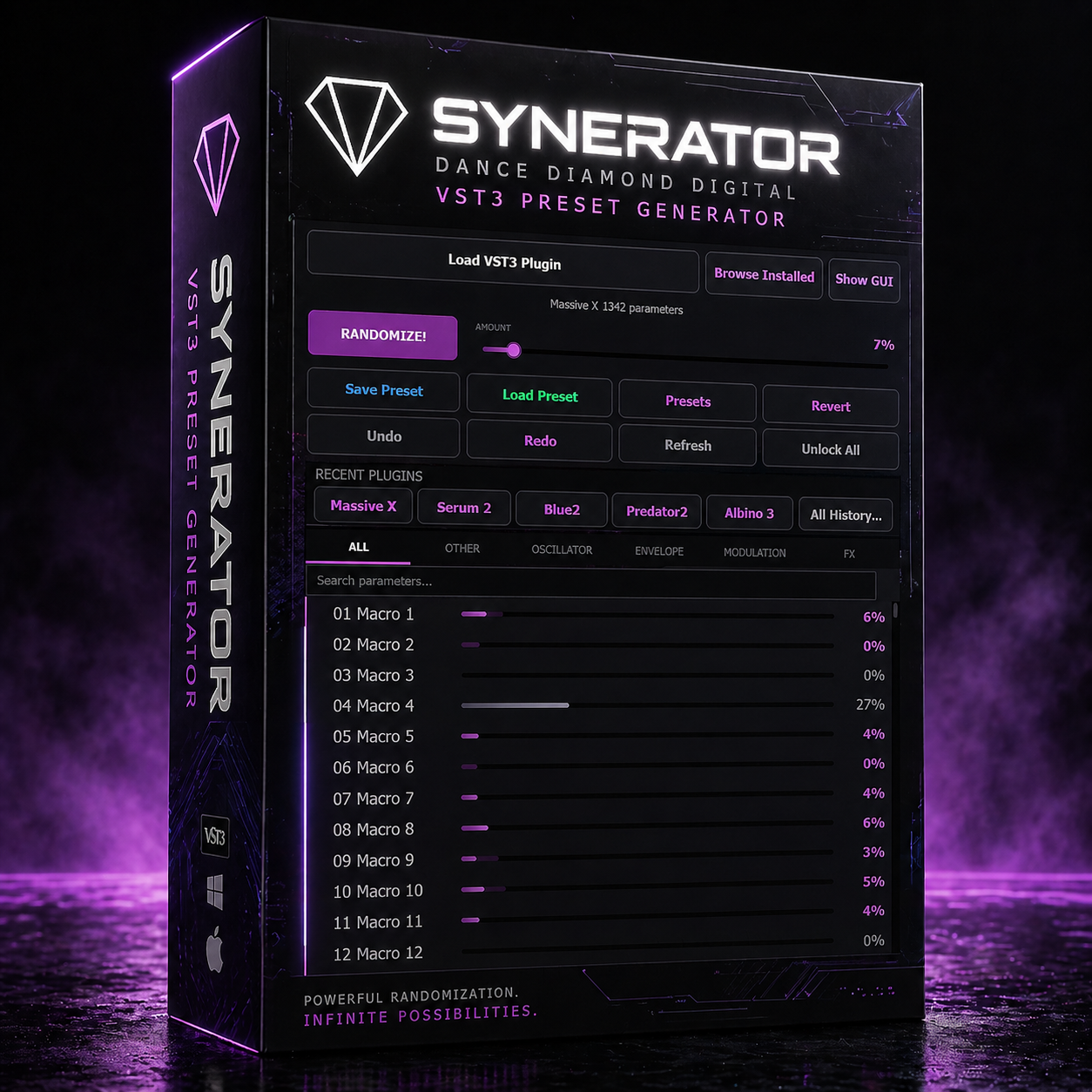
Synerator // Synth Randomizer for Producers

Sale Price: $19.00 Original Price: $29.00

Synerator is a VST3 plugin that hosts your favorite synthesizers and randomizes their parameters to help you discover sounds you'd never create on your own. Load any VST3 synth, lock the parameters you love, set the randomization intensity, and hit Randomize to explore endless sonic possibilities. Perfect for producers looking to break out of creative ruts, build unique sound palettes, or just have fun experimenting. Works with Serum, Vital, Surge, Diva, and any other VST3 synthesizer. Includes both Windows and macOS versions with one purchase.

———————————————————————————————————

WHAT'S INCLUDED:

Your download includes both Windows and macOS versions of Synerator. One purchase, both platforms.

———————————————————————————————————

WINDOWS INSTALLATION:

1. Extract the downloaded ZIP file

2. Copy the entire "Synerator.vst3" folder to: C:\Program Files\Common Files\VST3\

(Important: Copy the whole Synerator.vst3 folder as-is — do not open it or look for files inside it. Your DAW knows how to read it.)

3. Open your DAW (Ableton, FL Studio, Reaper, Bitwig, etc.)

4. Rescan your plugins if needed

5. Load Synerator as a VST3 Instrument on a MIDI/Instrument track

6. Start making sounds!

———————————————————————————————————

macOS INSTALLATION:

1. Extract the downloaded ZIP file

2. Copy "Synerator.vst3" to: /Library/Audio/Plug-Ins/VST3/

(Tip: In Finder, click Go > Go to Folder and paste the path above)

3. Open your DAW (Ableton, Logic, Reaper, etc.)

4. Rescan your plugins if needed

5. Load Synerator as a VST3 Instrument on a MIDI/Instrument track

6. Start making sounds!

———————————————————————————————————

QUICK START:

1. Load Synerator on a MIDI/Instrument track in your DAW

2. Click "Load VST3 Plugin" or "Browse Installed" to load your favorite synth

3. Click "Show GUI" to open the synth's interface and dial in a starting sound

4. Use the lock icons to protect parameters you want to keep (oscillators, filters, etc.)

5. Set the AMOUNT slider to taste (start low — 3-10% for subtle variations)

6. Hit RANDOMIZE and discover new sounds!

7. Save your favorites with "Save Preset" as .synpreset files

———————————————————————————————————

TIPS:

- Right-click any category tab (Oscillator, Filter, FX, etc.) to lock the entire category at once

- Click the Dance Diamond Digital logo for accent color, font size, background skins using your favorite photos, and About info

- Drag and drop any .vst3 file directly onto Synerator to load it instantly

- Your recent plugins are saved for quick access — find them in the Recent Plugins bar

———————————————————————————————————

SYSTEM REQUIREMENTS:

- Windows 10 or later (64-bit)

- macOS 10.13 or later

- A DAW that supports VST3 instruments

- At least one VST3 synthesizer plugin installed

———————————————————————————————————

SUPPORT:

Website: www.scottbrio.com

Plugin Page: www.scottbrio.com/synerator

GitHub: github.com/ScottBrio/Synerator

Created by Scott Brio — Dance Diamond Digital

"Randomize everything. Lock what matters."

Synerator is a VST3 plugin that hosts your favorite synthesizers and randomizes their parameters to help you discover sounds you'd never create on your own. Load any VST3 synth, lock the parameters you love, set the randomization intensity, and hit Randomize to explore endless sonic possibilities. Perfect for producers looking to break out of creative ruts, build unique sound palettes, or just have fun experimenting. Works with Serum, Vital, Surge, Diva, and any other VST3 synthesizer. Includes both Windows and macOS versions with one purchase.

———————————————————————————————————

WHAT'S INCLUDED:

Your download includes both Windows and macOS versions of Synerator. One purchase, both platforms.

———————————————————————————————————

WINDOWS INSTALLATION:

1. Extract the downloaded ZIP file

2. Copy the entire "Synerator.vst3" folder to: C:\Program Files\Common Files\VST3\

(Important: Copy the whole Synerator.vst3 folder as-is — do not open it or look for files inside it. Your DAW knows how to read it.)

3. Open your DAW (Ableton, FL Studio, Reaper, Bitwig, etc.)

4. Rescan your plugins if needed

5. Load Synerator as a VST3 Instrument on a MIDI/Instrument track

6. Start making sounds!

———————————————————————————————————

macOS INSTALLATION:

1. Extract the downloaded ZIP file

2. Copy "Synerator.vst3" to: /Library/Audio/Plug-Ins/VST3/

(Tip: In Finder, click Go > Go to Folder and paste the path above)

3. Open your DAW (Ableton, Logic, Reaper, etc.)

4. Rescan your plugins if needed

5. Load Synerator as a VST3 Instrument on a MIDI/Instrument track

6. Start making sounds!

———————————————————————————————————

QUICK START:

1. Load Synerator on a MIDI/Instrument track in your DAW

2. Click "Load VST3 Plugin" or "Browse Installed" to load your favorite synth

3. Click "Show GUI" to open the synth's interface and dial in a starting sound

4. Use the lock icons to protect parameters you want to keep (oscillators, filters, etc.)

5. Set the AMOUNT slider to taste (start low — 3-10% for subtle variations)

6. Hit RANDOMIZE and discover new sounds!

7. Save your favorites with "Save Preset" as .synpreset files

———————————————————————————————————

TIPS:

- Right-click any category tab (Oscillator, Filter, FX, etc.) to lock the entire category at once

- Click the Dance Diamond Digital logo for accent color, font size, background skins using your favorite photos, and About info

- Drag and drop any .vst3 file directly onto Synerator to load it instantly

- Your recent plugins are saved for quick access — find them in the Recent Plugins bar

———————————————————————————————————

SYSTEM REQUIREMENTS:

- Windows 10 or later (64-bit)

- macOS 10.13 or later

- A DAW that supports VST3 instruments

- At least one VST3 synthesizer plugin installed

———————————————————————————————————

SUPPORT:

Website: www.scottbrio.com

Plugin Page: www.scottbrio.com/synerator

GitHub: github.com/ScottBrio/Synerator

Created by Scott Brio — Dance Diamond Digital

"Randomize everything. Lock what matters."